Download for free and get writing in under a minute
- Opens in under a second so you can quickly capture an idea.
- No loading screens or locked formats.
- Made by a writer for writing. Nothing more.
- Free to download, free to keep. Support is optional.
- Your folders. Your location. Your drive.
- Back up to the cloud or USB like any other folder.
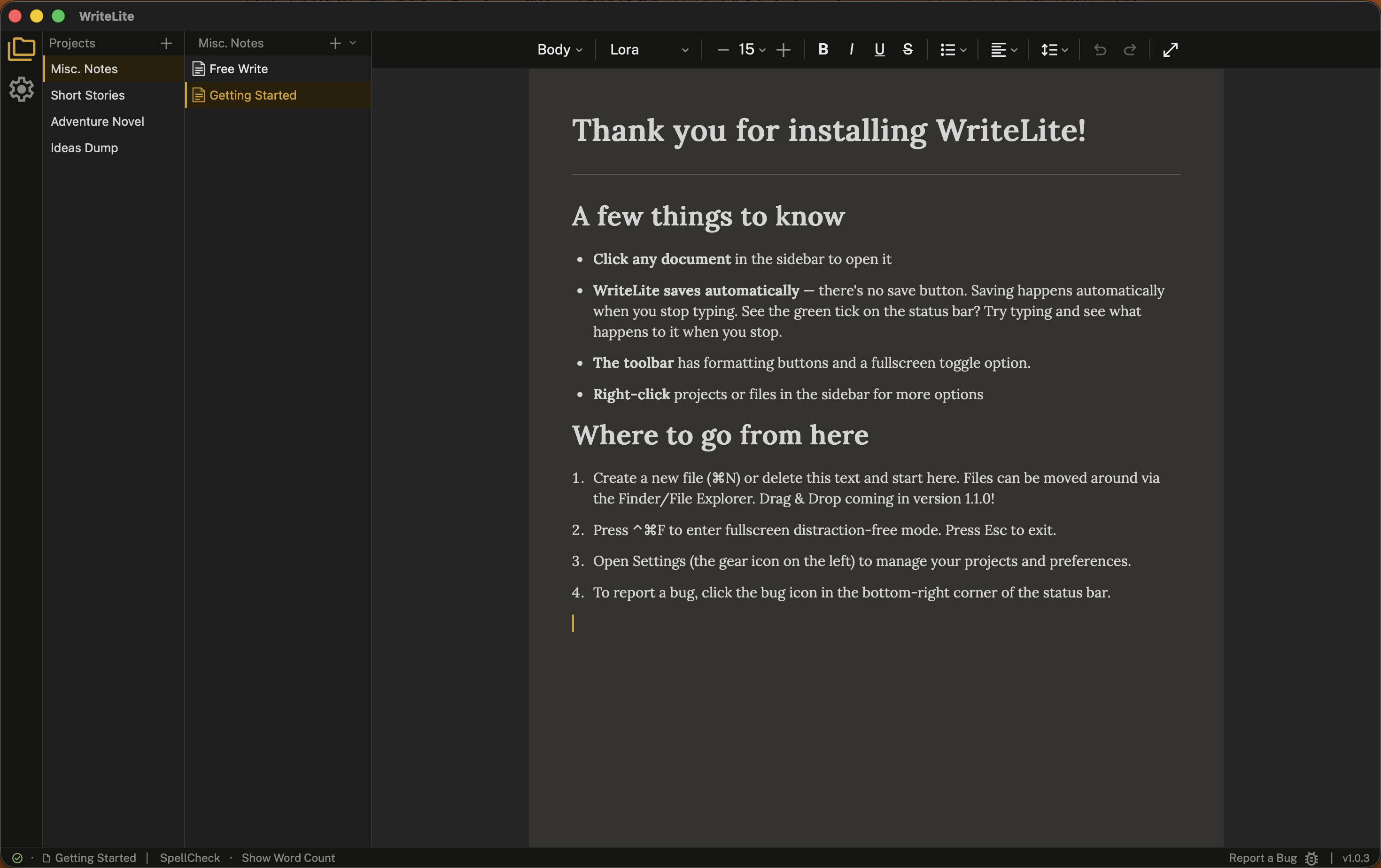
WriteLite is built by one developer who is also a writer. It is a tool with a single conviction — let the writer get their ideas out as fast as they can type them. No waiting for a load screen. No wondering where the files went.
Most writing software does too much, starts too slowly, or insists on keeping your files in a format it controls. WriteLite will not.
WriteLite targets a startup time under half a second — faster than most apps finish their loading screens. When you have an idea, the gap between thought and page matters. WriteLite makes that gap as small as possible. The speed of typing meets the immediacy of pad and pen. WriteLite is ready when you are.
Every document is saved as a .wlite file— markdown text underneath, which means any word processor or writing app on any computer can open it. There is no lock-in. Your files belong to you, not to WriteLite.
WriteLite does not care where your files live. It opens them, saves them, and asks nothing else. What you write is already a file on your computer.
Put your project folders in the cloud or save them to a USB for easy backup, and tell WriteLite where you're keeping them.
Pour your stream of consciousness onto the page in a way that suits you. Use Full-Screen mode to make distractions vanish.
Writing shouldn't cost a subscription, so WriteLite is free with no expectations, no obligations, and nothing withheld. Built by one writer who codes, consider this a gift from me to you. The development of WriteLite is sustained by donations alone. It has no locked formats or paywalls and does not store any of your data on the cloud. Your files belong to no platform.
What you pay for is what you're asking the world to make more of. If this app gave you something, there's a way to give something back. No pressure, but the door is open. This is how I keep the lights on.
WriteLite has no server, no account requirement, and no telemetry. Nothing you write leaves your machine. WriteLite will never read your documents, request access to your files beyond what you open yourself, or store anything outside your own disk. What you write is yours, completely and permanently.
Roadmap
-
Planned
Session Goals
Set a time or word count goal and track your progress in the status bar.
-
Fixing
Slow Loading for Giant Files
When loading or importing files that are 30,000+ words the app lags when loading or scrolling through the file.
-
Exploring
Customizable UI
Exploring a new way to make WriteLite feel like yours. The current UI feels stiff. I am exploring something I've not seen before. The idea is to make WriteLite "a page with flexible tools".
-
Exploring
Themes
Eight distinct themes to make WriteLite feel like yours.
-
Exploring
Wider File Format Support
Support importing from .doc files; exporting to .doc and .pdf.
Patch Notes
v1.2.1 10 October 2026
Custom spellcheck lands in this release — WriteLite's own engine.
- Click a misspelled word to see suggestions, ignore it, or learn it.
- Learn as a word or a name. Names treat 's as part of the spelling, so learning Avaroth also accepts Avaroth's.
- Red squiggles stay responsive across all files and all operating systems.
v1.2.0 01 October 2026
Typewriter mode lands in this release — a focus mode that keeps only a few lines on screen and gets the UI out of the way.
- Typewriter mode — Command+Shift+T on Mac, Control+Shift+T on Windows.
- Closed folders expand when dragged and hovered over.
- Right-click a .wlite file to export.
- Drag a file into WriteLite to import it.
- Fixed a bug that stopped the app from opening with the correct text floor settings.
- On Windows: right-click → New → WriteLite Document.
- Small UI improvements, including aligned folders and subfolders.
- Fixed an issue with the spellcheck toggle. Custom spellchecker engine coming soon.
v1.1.0 25 September 2026
Drag and drop lands in this release — move files and folders between projects, set your own order, and merge projects when you need to.
- Theme adjustments; buttons feel stronger.
- Fixed an issue where files would not display in some projects.
- Fullscreen key commands are consistent across versions and feel better to use.
- File handling for raw markdown refactored.
- File tree visual structure updated — cleaner look.
- Status bar labels replaced with icons; buttons are more compact.
- Expanded settings options.
- Updated menubar layout.
- Sorting is now an action, not a state — custom order is always available.
- Drag and drop: move files and folders between projects, reorder freely, and merge projects.
- Fullscreen icon updated.
v1.0.4 11 August 2026
- .wlite files are markdown + some HTML under the hood. This patch cleaned up the file format so the raw markup view is cleaner.
- The .wlite icon appear less squashed
- Users can now set their own default settings per file. Per project settings coming soon.
- System theme option available from the menu bar
- Fixed an issue where files would occasionally open WriteLite at the wrong project
v1.0.3 15 July 2026
This patch brings a new welcome experience. The first time you open WriteLite it now walks you through the app and lets users set their theme preference from the start.
- Choose your theme during setup — Dark, Light, or System. System follows your computer’s own appearance setting and switches along with it while the app is open, and WriteLite now opens in the right theme straight away instead of flashing the wrong one first.
- Blank lines you deliberately leave in a document no longer disappear when it reloads.
- Fixed a bug that prevented sorting files by “Last Updated”.
- Fixed markdown rendering inconsistencies across .wlite and .md files.
- Fixed some awkward UI bugs that left old information on the page.
- Improved support for imported files.
- Known issue: very large documents (100,000+ words) are slow to open, and the window may stop responding while they load.
v1.0.2 12 July 2026
- The File View window now has a full menu bar on macOS, matching Windows.
- Settings has moved into the menu bar, so it is quicker to reach.
- WriteLite now reopens the files you had open in File View when you last closed it — you can turn this off in Settings.
- You can now close individual file tabs with the × button or by right-clicking, instead of closing the whole window.
- On macOS, double-clicking a file in Finder — or dragging it onto the app — now opens it directly, instead of launching to the default window.
- Links now stand out in the accent colour.
- In the light theme, faint and disabled text is clearer and easier to tell apart from ordinary text.
v1.0.1 11 July 2026
- Switching between projects now opens the correct document instead of leaving the previous file on screen, and each project remembers the last file you had open.
- Links you add are kept when you reopen a file — previously they could vanish on reload. You can also type a link inline as [text](https://…) and it becomes clickable.
- Imported files are better supported — .txt and .md files now open alongside .wlite.
- Importing now offers a “keep original format” option so files come in as-is.
- Re-adding an existing project no longer resets its settings — sort order, expanded folders, and name are preserved.
- Fixed a problem where renaming a project could break it and make it show as “missing” after a restart.
- The formatting toolbar is now centred and scrolls when there isn’t room to show every button.
- Entering and leaving fullscreen is now a smooth transition.
- On macOS, the fullscreen shortcut hint now correctly shows ⌃⌘F — it previously listed a shortcut that did nothing.
- Renamed the “Documentation” menu item to “Guides & How-Tos”.
v1.0.0 01 July 2026
- WriteLite published.
A Community Effort
WriteLite has a Discord Community Server where writers of all genres, styles and experience levels are invited to gather, share, and discuss the craft of writing. This is a place for creative discussion, direction communication with the developer, NEL, and may host competitions in the future.
Following the Studio NEL Instagram page is a great way to keep track of updates or reach out to the developer directly.
These are both places where you can reach out to the developer directly with questions, suggestions and feedback.